proxy server
a proxy is server is a middleman to your pc/app and the server all request is gone through the proxy server and proxy server forward request to main server.
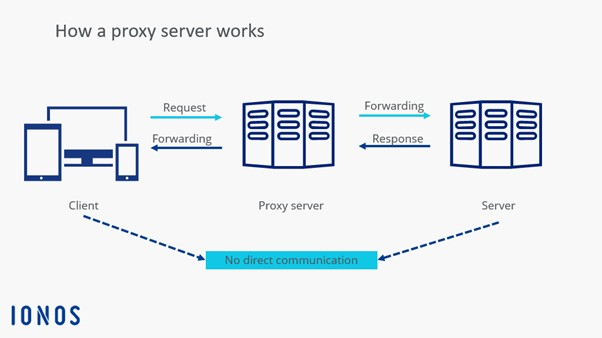
what does it do?
- Hide your IP address
- Cache data to improve speed
- Bypass restrictions
there are two types of proxy:
Forward proxy :- A server that acts as an intermediary between clients and the internet,
Reverse proxy :- A server that acts as an intermediary between clients and backend servers. for load balancing , security.
Transparent Proxy — forwards requests without hiding the client's identity.
Anonymous Proxy — hides the client's IP address.
High-Anonymity (Elite) Proxy — hides the client's IP and usually hides that a proxy is being used.
Residential Proxy — uses IP addresses associated with residential internet connections.
Datacenter Proxy — uses IP addresses from data centers.
WHICH PROXY IS DETECTABLE?
forward proxy and reverse added X-Forwarded-For, X-Real-IP, and Forwarded in the header so detectable is easily but High-Anonymity (Elite) Proxy dont add to header at all.
proxy protocols:
so there are two types of proxy protocol we can build. http and socks5 http used in browsers and other to forward only http clients and socks can forward any protocol.
HTTP PROXY - CONNECT method → HTTPS tunneling
SOCKS5 PROXY - SOCKS5 protocol → TCP/UDP proxying
HTTP PROXY
http proxy are two type forward (normal) and elite/High-Anonymity proxy. we gonna build anoymity one secure privacy and bypass-blocking.
GET  http://example.com/ HTTP/1.1\r\n
Host: example.com:80\r\n
User-Agent: TestBrowser\r\n
Accept: */*\r\n
Connection: keep-alive\r\n
\r\n
basic idea is GET HEADER
METHOD:- GET LOCATION:- http://example.com/ VERSION:- HTTP/1.1
WE HAVE TO DO
Client
  │
  │ GET http://example.com/hello
  ▼
Proxy
  │
  │ extract URL
  │
  ├── destination → example.com:80
  └── path → /hello
  │
  ▼
Server
  │
  │ GET /hello
  │ Host: example.com
  ▼
Ok but how will send body and other stuff?
good question, we will read header until \r\n then we will read until Content-Length: 27 bytes.
we will copy that much byte and direcly pass it to web server with io.CopyN
io.CopyN is a function in the Go standard library package io that copies a specific number of bytes (n) from a source reader to a destination writer. [1, 2]
In the Go programming language, io.Copy is a built-in utility function in the Go io Package that transfers data from a source reader to a destination writer
Your Complete Build Checklist
- Accept Connection & Spawn Goroutine (
go handleConn(conn)). - Read Request Headers until the blank line delimiter.
- Extract Target Host & Port (e.g., parse URI or
Host:header, default to port80). - Dial Target Server (
net.Dial("tcp", host + ":" + port)). - Forward Request: Pass headers + request body (if present) to target.
- Stream Response: Copy bytes directly from target back to client until finished.
- Cleanup: Close both TCP connections.
good jomb we have made a http proxy 😇
HTTPS PROXY
HTTPS stands for Hypertext Transfer Protocol Secure. It's an extension of HTTP, the foundation of data communication on the World Wide Web.
cause it has tls and ssl right now we cant view or interecpt the request we can just connect both tunnel.
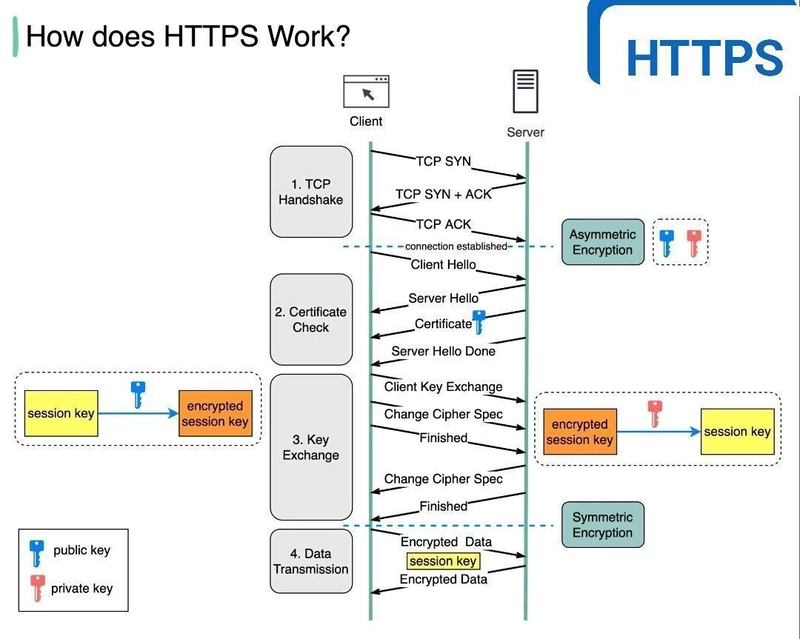
what to do:
- client will send
CONNECT ipinfo.io:443 HTTP/1.1\r\n
Host: ipinfo.io:443\r\n
User-Agent: curl/8.20.0\r\n
Proxy-Connection: Keep-Alive\r\n
\r\n
- open tcp connection with
ipinfo.io:443 - return connection establised to the client
HTTP/1.1 200 Connection Established\r\n\r\n
- now make a bidirectional connection between
reader -> targetandtarget -> client - BOOM HTTPS PROXY
encryption and security will be handled my client directly
authentication
auth s important cause if we start our proxy server in production wtih open port anyone can connect it and can use it for any purpose and spam it draining your bandwidth.
so we add authenticaiton to allow only woh has username and password
Structure: protocol://username:password@hostname:port
when i use this curl or browser add it in header like:
> Proxy-Authorization: Basic YWRtaW46SWdmVj2bdRpbmcx
Basic - basic means base64 and YWRtaW46SWdmVj2bdRpbmcx has username and password.
the proxy server decodes it and compare with username password stored in backend.
BLACKLISTING
suppose there are sites we want to block. we can check the host and compare it with our blacklist siites and return 403 Forbidden to the client.
  {....
  "blacklist": [
    "youtube.com",
    "www.twitch.tv",
    "example.com"
  ]
}
LOGS
Logs record important events happening inside the proxy so we can inspect what happened later.
2026-08-25 20:31:42 | admin | 192.168.1.5 | twitch.tv:443 | HTTPS | ALLOWED
2026-08-25 20:31:45 | admin | 192.168.1.5 | youtube.com:443 | HTTPS | BLOCKED
2026-08-25 20:32:01 | unknown | 192.168.1.5 | - | AUTH_FAILED
We can store logs in a file such as:
proxy.log