Docker
Docker **is a tool that simplifies the process of developing, packaging, and deploying applications. It solves the “works on my machine” problem by ensuring code runs identically across environments.
Its like a container like a box packs all the dependency,apps,everything and you can send the container they can just run it and use your project. No need to download any libs,dependency anything.
By bundling the application code with its specific dependencies into a single unit, it ensures the software runs identically whether it’s on a developer's laptop, a test server, or a cloud cluster.
COMPONENTS OF DOCKER
- The Docker Client (CLI): The client is the interface you use to send instructions to Docker
docker run, the client sends this command to the daemon via a REST API. - The Docker Daemon (
dockerd): The daemon is the background service responsible for managing Docker resources. - Docker Registry (Docker Hub): A registry stores and distributes Docker images. Docker Hub is a popular public registry, but private registries and other public registries are also available like github.
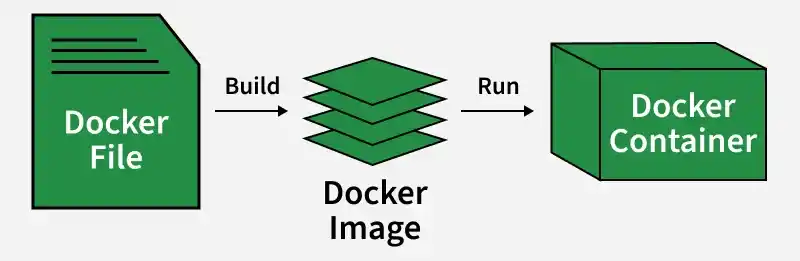
- Dockerfile: A text file containing instructions for building a Docker image.Defines the base image, working directory, copied files, ports, and startup command
- Docker Images: Read-only templates used to create containers,Contain the application code, runtime, libraries, and other required files. Are built using a
Dockerfile. - Docker Container: A runnable instance of an image. It is the living, breathing application that you can start, stop, move, or delete.
INSTALLATION
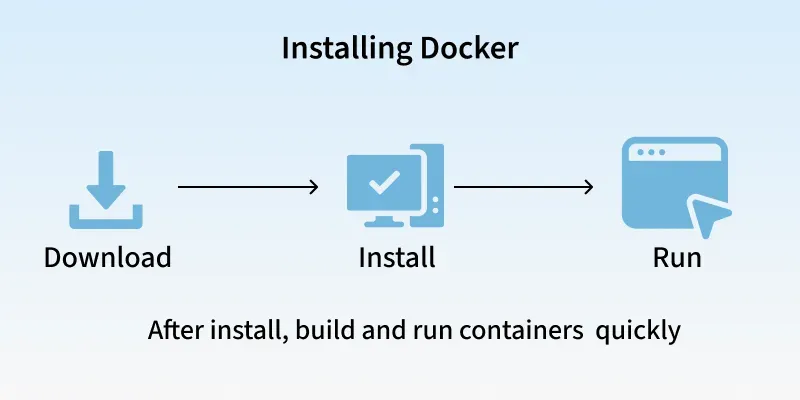
download docker
sudo pacman -Syu
sudo pacman -S docker docker-compose docker-buildx
Start the Docker daemon
sudo systemctl enable --now docker
Check its status
systemctl status docker
COMMANDS
$ docker ps [options..]
This command (by default) shows us a list of all the running containers. We can use various flags with it.
- a flag: shows us all the containers, stopped or running.
- l flag: shows us the latest container.
- q flag: shows only the Id of the containers.
docker --help |
Display available commands |
|---|---|
docker info |
Show Docker system information |
docker version |
client and server versions |
docker ps |
List running containers |
docker ps -a |
List all containers |
docker images |
List local images |
docker pull nginx |
Download an image |
docker search nginx |
Search Docker Hub |
docker events |
Stream Docker events |
Searching
--> docker search debian

NAME                DESCRIPTION                                     STARS     OFFICIAL
debian              Debian is a Linux distribution that's compos…   5324      [OK]
dockette/debian     🐳 Debian base images                           3
gentkit/debian      A Docker image based on Debian Linux .          0
corpusops/debian    debian corpusops baseimage                      0
rootpublic/debian                                                   0
treehouses/debian                                                   2
vulhub/debian                                                       0
voxpupuli/debian                                                    0
debian/eol          End of Life Debian versions (pointing at arc…   14
debian/snapshot     "debian", but with sources.list pointing to …   9
debian/buildd       https://hub.docker.com/_/debian/ but --varia…   2
smartentry/debian   debian with smartentry                          6
debian/archvsync                                                    0
i386/debian         Debian is a Linux distribution that's compos…   17
amd64/debian        Debian is a Linux distribution that's compos…   18
arm64v8/debian      Debian is a Linux distribution that's compos…   50
arm32v7/debian      Debian is a Linux distribution that's compos…   78
32bit/debian        Debian for i386 (32bit)                         19
arm32v5/debian      Debian is a Linux distribution that's compos…   7
s390x/debian        Debian is a Linux distribution that's compos…   6
ppc64le/debian      Debian is a Linux distribution that's compos…   4
jitesoft/debian     Debian base image.                              0
ustclug/debian      Official Debian Image with USTC Mirror          2
vptech/debian       Docker images of Debian.                        0
1tsme/debian        Debian images across 5 suites x 3 flavors, w…   0
downloading a image
--> sudo docker pull debian

Using default tag: latest
latest: Pulling from library/debian
4846f2900730: Pull complete
50f5607b0ccc: Download complete
Digest: sha256:913f6706df59a68922d1dd08f78c2476560a8d367897200a6005b00e5f67c2d5
Status: Downloaded newer image for debian:latest
docker.io/library/debian:latest
running
# Create and run a container
docker run nginx

# Run in background
docker run -d nginx

# Assign a name
docker run -d --name web nginx

# Publish a port
docker run -d --name web -p 8080:80 nginx
Using docker run to Start an Interactive Shell
- i (--interactive): Keeps standard input (STDIN) open, allowing you to type commands.
- t (--tty): Allocates a pseudo-terminal, which gives you the interactive shell experience.
sudo docker run -it ubuntu bash
Look for installed images
~$ sudo docker images
                                                                                        i Info →   U  In Use
IMAGE           ID             DISK USAGE   CONTENT SIZE   EXTRA
debian:latest   913f6706df59        187MB         52.6MB    U
run in background
rajma@bigbooster:~$ sudo docker run -d -it python
01d195b21aed15f3a2b4ebd42159def84b1a3475ad4418ab919fe6f86d7581d1
rajma@bigbooster:~$ sudo docker ps
CONTAINER ID   IMAGE     COMMAND     CREATED         STATUS         PORTS     NAMES
01d195b21aed   python    "python3"   9 seconds ago   Up 9 seconds             cranky_farada
Dockerfile Syntax
A Dockerfile is a plain-text file containing a sequence of instructions that Docker uses to build an image
• Instruction first: Each line starts with an instruction such as FROM, RUN, COPY, or CMD.
• Comments: Lines beginning with # are treated as comments and ignored by the Docker builder.
| Instruction | Purpose |
|---|---|
FROM |
Specifies the base image for the Docker image. |
RUN |
Executes commands while building the image. |
ENV |
Sets environment variables. |
ENTRYPOINT |
Defines the main command that runs when the container starts. |
CMD |
Specifies the default command or arguments for the container. |
EXPOSE |
Documents the port on which the container listens. |
VOLUME |
Creates a mount point for persistent or shared data. |
WORKDIR |
Sets the working directory for subsequent instructions. |
USER |
Specifies the user that runs the container process. |
COPY |
Copies files and directories from the build context into the image. |
# |
Adds comments that are ignored by Docker. |
1. FROM
A FROM statement defines which image to download and start from
FROM java: 8
2. RUN (executes only in build)
The RUN instruction executes commands during the Docker image
RUN unzip install.zip /opt/install
RUN echo hello
3. ENV
The ENV statement sets environment variables
ENV URL_POST=production.example-gfg.com
4. ENTRYPOINT
It specifies the starting of the expression to use when starting your container
ENTRYPOINT ["python"]
CMD ["app.py"]
5. CMD (run on every container)
The CMD instruction specifies the default command to run when a container starts
CMD ["program-foreground"]
CMD ["executable", "program1", "program2"]
6. EXPOSE
The EXPOSE instruction informs Docker that the container listens on a specific network port at runtime
EXPOSE 5000
EXPOSE 8080/udp
7. WORKDIR
As the name suggests, WORKDIR sets the directory that the container starts in
WORKDIR /directory-name
8. COPY
Copies files and directories from the build context into the image.
COPY <source> <destination>
COPY app.py   .
Examples:1.
FROM ubuntu:22.04

ENV APP_ENV=production

WORKDIR  /app

RUN apt-get update && apt-get install -y curl

COPY . .

VOLUME ["/app/data"]

EXPOSE 8080

CMD ["echo", "Dockerfile example"]
FROM python:3.12-slim

WORKDIR /app

COPY app.py .

CMD ["python", "app.py"]
Docker Image Operations
| Command | Description |
|---|---|
| docker image build | This command is used for building an image from the Dockerfile |
| docker image history | It is used for knowing the history of the docker image |
| docker image inspect | It is used for displaying the detailed information on one or more images |
| docker image prune | It used for removing unused images that are not associated with any containers |
| docker image save | This command helps in saving the docker images into a tar archived files |
| docker image tag | It helps in crating a tag to the target image that refers to the source image. |
Docker Image Build
The Following is the command which is used to build the docker image.
docker build -t your_image_name:tag -f path/to/Dockerfile
- Docker build: Initiates the build process.
- t your_image_name:tag: Gives the image you're creating a name and, if desired, a tag.
- path/to/Dockerfile . : Gives the location of the Dockerfile. Give the right path if it's not in the current directory. "(.) DOT" represents the current wordir.
COMPOSE
Docker Compose makes it easier to define and manage multi-container applications from a single configuration file
compose.yaml
services:
  web:
    image: nginx:alpine
    ports:
      - "8080:80"
services:Defines the services (containers) in your application.
web:The service name. You choose it; web, nginx, and frontend are all possible names.
image: nginx:alpineTells Docker which image to use. Docker downloads it if needed.
ports:Publishes a container port to your host.
"8080:80"Maps host port 8080 → container port 80.
KEYWORDS
| Keyword | Meaning | Example |
|---|---|---|
services |
Defines your application's services/containers | services: |
image |
Specifies an existing Docker image | image: nginx:alpine |
build |
Builds an image from a Dockerfile | build: . |
container_name |
Sets a custom container name | container_name: myapp |
ports |
Maps host ports to container ports | - "8080:80" |
expose |
Documents ports for internal container communication | expose: ["5000"] |
volumes |
Mounts storage or host directories | - ./app:/app |
environment |
Sets environment variables | APP_MODE: production |
env_file |
Loads environment variables from a file | env_file: .env |
command |
Overrides the image's default command | command: python app.py |
entrypoint |
Overrides the container entrypoint | entrypoint: ["python"] |
working_dir |
Sets the working directory | working_dir: /app |
restart |
Configures restart behavior | restart: unless-stopped |
depends_on |
Defines service startup dependencies | depends_on: [db] |
networks |
Connects services to networks | networks: [backend] |
healthcheck |
Checks whether a container's service is healthy | healthcheck: |
deploy |
Configures deployment-related settings | deploy: |
example:
services:
  app:
    image: nginx:alpine
    ports:
      - "8080:80"
    networks:
      - frontend

networks:
  frontend:
    driver: bridge
:
NOTE (VOLUMES):
Compose has two volume mounts one is Named volume and Bind mount.
A. Named volume
Docker manages the storage.
services:
  db:
    image: postgres:17
    volumes:
      - db_data:/var/lib/postgresql/data

volumes:
  db_data:
B. Bind mount
You connect a specific directory on your computer to a directory inside the container.
services:
  app:
    image: python:3.12-slim
    working_dir: /app
    volumes:
      - ./app:/app
    command: python app.py
connects to
compose-lab/
└── app/
    └── app.py
| Feature | Named volume | Bind mount |
|---|---|---|
| Storage location | Managed by Docker | Specific host path |
| Best for | Database data | Source code and configuration |
| Easy to inspect from host | Less convenient | Yes |
| Survives container removal | Yes | Host files remain |
| Typical example | db_data:/var/lib/postgresql/data |
./app:/app |
COMMANDS
| Command | Purpose |
|---|---|
docker compose up |
Create and start services |
docker compose up -d |
Start in background |
docker compose down |
Stop and remove containers and the Compose network |
docker compose ps |
List services and their status |
docker compose logs -f |
Follow container logs |
docker compose restart |
Restart services |
docker compose stop |
Stop services without removing them |
docker compose pull |
Download newer images |
docker compose build |
Build images configured with build |
docker compose exec app sh |
Open a shell in the running app container |
docker compose config |
Validate and display the resolved configuration |