I Built My Own BitTorrent Client in Go—Here's How BitTorrent Really Works
BitTorrent is far more than just downloading files. This article explores how the protocol distributes data across thousands of peers while walking through the implementation of a complete BitTorrent client in Go, from parsing torrent files to downloading and verifying pieces.
INTRODUCTION
Bitorrent is a peer-to-peer (P2P) network where every server/node/computer is connected node to the network as act as all. BitTorrent was created in 2001 byBram Cohen
https://dev.to/kurealnum/but-how-does-torrenting-actually-work-5hlf
The problem at that time: How do you distribute large files to millions of people without destroying your server?
BitTorrent protocol was created to make downloads faster and more efficient.
| HTTP | BitTORRENT |
|---|---|
| one server one client | no main server (after inital seeding) |
| Only the server uploads | every node upload with each other |
| One continuous stream | File split into small pieces |
| Web pages,APIs,Small-medium files,Real-time communication | Large file distribution,Reducing bandwidth cost |
- The file that gets uploaded gets divided into pieces, which in turn gets divided into blocks. So every client transfers blocks of a piece of a file to the one that’s requesting it.
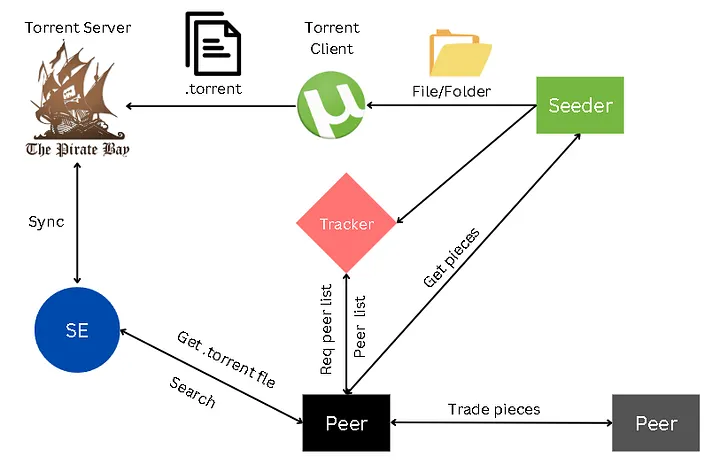
Peers :- all the computers that are part of the network. the active ones are called active peers.
Seeders:- are the nodes which have downloaded file and sharing with other nodes.
Leechers:- are the node downloading blocks/pieces from the seeders/peers.
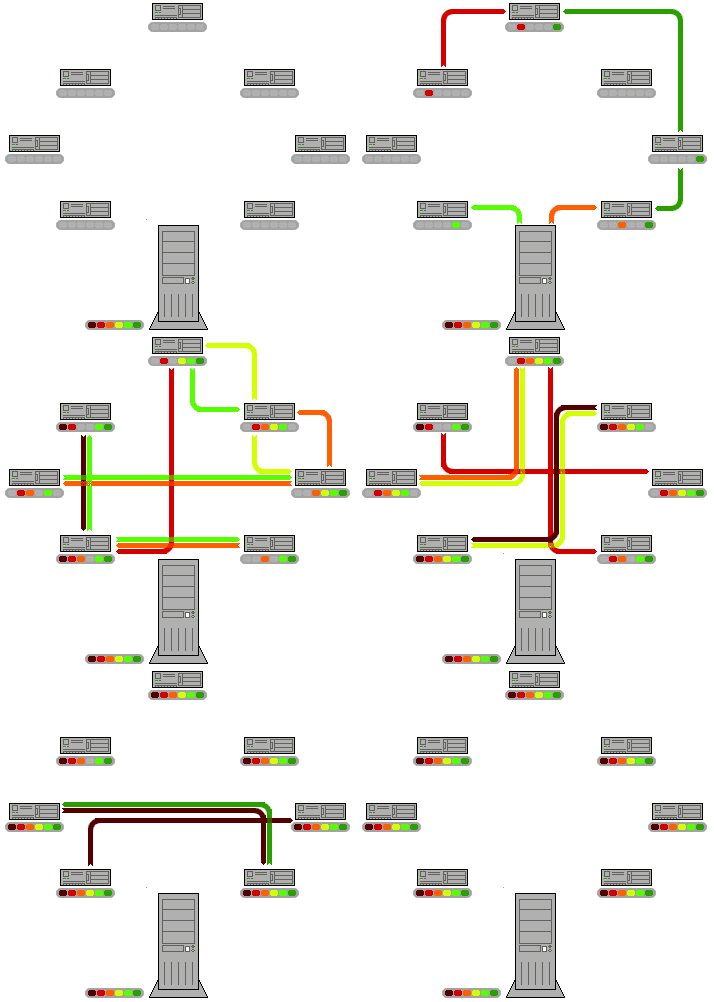
HOW IT WORKS (AS A CLIENT)
- User download .torrent file. it has info about tracker,file,size,peices,hashes.
- Now the Client contact tracker or other peers (DHT) it returns peers list with ip.
- client open several tcp connection TO EVERY PEER IN SWARM. to get information about who has which piece.
you are officially in the swarm4.now you download and find pieces form the peers (here chocking system works). 5.Each piece has a hash stored in the torrent metadata now you check it with in the torrent file if piece = hash in torrent file .ok
BOOM YOU HAVE SUCESS FULLY DOWNLOADED FILE AND CONTRIBUTED TO OBV.
.torrent file structure
metadata file (typically a few KB) .torrent file contains all the information you need to download all the pieces of the file which is distributed across the network
{
  "announce": "...",
  "announce-list": [...],
  "creation date": ...,
  "created by": "...",
  "comment": "...",
  "info": { ... }
}
- size :- KB
- encoding :- Bencode format
things on file:-
- announce: primary tracker URL.
- announce-list: optional list of backup trackers (tiers).
- info: the most important dictionary; its exact byte representation is hashed to form the torrent’s infohash in v1.
- Optional metadata like creation date, created by, comment, and encoding may appear depending on the creator
info structure
{
  "name": "...",
  "piece length": ...,
  "pieces": "...",
  "length": ...        // single file
}
name: suggested filename (single-file) or top-level directory name (multi-file).piece length: size in bytes of each piece.-
pieces: concatenation of 20-byte SHA-1 hashes, one per piece (so total length is a multiple of 20 bytes). -
Single-file mode:
length(file size in bytes). - Multi-file mode:
files= list of dictionaries, each withlengthandpath(a list of path components).
for some new bozo like me hashing is like a function algorithm when if you enter data it will show exactly same hash every time to check if data is correct. we use hashing function to see if the data is same as the stored hashing in .torrent file
BENCODE ENCODING
its the encoding in which .torrent files are written and how we talk to peers. its extremly easy system (what people say) but i find challanging to code lol.
so its like :
| TYPE | FORMAT |
|---|---|
| INTEGER | i<number>e |
| STRING | <length>:<data> |
| LISTS | l <item1> <item2> ... e |
| Dictionaries | d <key><value> <key><value> ... e |
dictionaries keys must be string MUST be sorted lexicographically
Tracker
A tracker is simply an server that keeps track of all the peers and what piece/block of the file they have.*
It also receives per-peer stats like uploaded, downloaded, and left* from announces, and can aggregate counts like “seeders” and “leechers.”
there are two types of tracker http tracker and udp tracker http is simpler to talk but half of tracker rely on udp.
trackers are mostly hosted by open source contributers and volunteers.
some trackers:
udp://tracker.opentrackr.org:1337/announce
udp://open.stealth.si:80/announce
udp://tracker.torrent.eu.org:451/announce
udp://tracker.openbittorrent.com:6969/announce
[http://tracker.openbittorrent.com:80/announce](http://tracker.openbittorrent.com/announce)
udp://exodus.desync.com:6969/announce
UDP TRACKER PROTOCOL IMPLEMENTATION
The UDP Tracker protocol is composed of only 2 pairs of request/response messages, totalling 4 distinct. These will correspond to 4 UDP packets/datagrams/messages. Note that every single mainstream torrent client out there (e.g. Transmission, Deluge) must implement this logic.

Protocol – Connect Request
protocol id: 8 bytes integer    // always the magic number 0x41727101980
action: 4 bytes integer         // should be 0
transaction id: 4 bytes integer // randomly generated.  Important. Used to match request with response
Protocol – Connect Response
action: 4 bytes integer          // should match the 0 of the request
transaction id: 4 bytes integer  // should match a transaction id of the request
connection id: 8 bytes integer   // random id generated by the tracker. identifies a connection
Protocol – Announce Request
connection id: 8 bytes integer         // a valid connection id received from a previous connection request/response pair
action: 4 bytes integer                // should be 1
transaction id: 4 bytes integer        // randomly generated id used to match with a future announce response
info hash: 20 bytes                    // sha-1 hash of the torrent file contents which identifies the torrent uniquely
peer id : 20 bytes                     // Azureus-style encoding -XX####-############
downloaded: 8 bytes integer            // informs the tracker how much of the torrent file you have already downloaded. Used for statistics
left: 8 bytes integer                  // informs the tracker how much of the torrent file you have still  need to download. Used for statistics.
uploaded: 8 bytes integer              // informs the tracker how much of the torrent file you have uploaded to other peers. Used for statistics.
event: 4 bytes integer                 //
ip address: 4 bytes                    // your ip address. usefull in case of proxies
key: 4 bytes integer                   // A random unique identifier generated by your client
number peers wanted: 4 bytes integer   // number of peers of the swarm that the tracker will return on the response Use -1 (or 0xFFFFFFFF) for the default tracker value
port: 2 bytes integer                  // the socket port number where the client
EVENTS
0 - none / Regular periodic announce (default) 1 - completed / Just finished downloading 2 - started / First announce when starting torrent 3 - stopped / Shutting down/stopping torrent
Protocol – Announce Response
action: 4 bytes integer           // should be 1
transaction id: 4 bytes integer   // should be 0
interval: 4 bytes integer         // randomly generated
leechers: 4 bytes integer         // total number of leecher
seeders: 4 bytes integer          // total number of seeders
peers: multiple of 6 bytes        // for each, the 1st 4 are the IP, and the remaining 2 the port number
network byte order
“Big endian” and “little endian” are about byte order: when a number uses multiple bytes (like 4 bytes), which byte is stored/sent first.
Big-endian :- means the most significant byte (MSB, the “big” part) comes first (at the lowest address / first on the wire) ex. 0x12345 to 12345 sent.
little-endian:- Little-endian means the least significant byte (LSB, the “small” part) comes first.
ex. 0x12345 to 54321 sent
THE BIGGEST BUG
note you will get stuck like me if your dumb like me to for info_hash you have to generate 20 byte sha1 hash of the info data NOTE (INFO : DATA) not info only the value you can get the starting position and ending from your bencode decoder it took me weeks to fix this bug lmao.
PEER CONNECTION
after getting IPs from tracker next step is to talk to every peer to know which has which piece.
note:- not every ip given from tracker will be reachable some will be offline some behind NAT or blocked by firewall. so you have to ping all the peer first
- Connecting with peer by simple tcp connection.
- doing a handshake immediately after connecting. (68 bytes)
Protocol – peer handshake
str_length: 1 byte integer     // must be 19
str : 19 bytes string          // string is "BitTorrent protocol"
reserved: 8 bytes              // all 0000
info_hash: 20 bytes            // SHA1 hash of info metadata .torrent file
peer_id: 20 bytes             // string used as a unique ID Azureus-style encoding -XX####-############
response from peer will be same. check if info_hash is same you sent.
CONGRATS YOU HAVE OPENED THE DOOR TO THE WHOLE MARKETPLACE
Messages after handshake
After handshake peer will send you msg
<length prefix 4 byte ><message ID 1 byte ><payload>
The message ID is one of:
0 - choke 1 - unchoke 2 - interested 3 - not interested 4 - have 5 - bitfield 6 - request 7 - piece 8 - cancel
'choke', 'unchoke', 'interested', and 'not interested' have no payload.
The first message after the handshake will be bitfield.
'bitfield' is only ever sent as the first message. Its payload is a bitfield with each index that downloader has sent set to one and the rest set to zero. Downloaders which don't have anything yet may skip the 'bitfield' message
example payload:
[1,1,1,1,1,1,1,0,0,0,0,1,0,1,1]
here are 15 peices 0 is not have 1 is have.
have - is send when you sucessfully download pice and boardcast to others.
scheduler → assigns piece → peer loop sends request
peer loop → receives data → downloader builds piece
downloader → completes → scheduler updates
choker → decides who stays active
peer management architecture
now we have the code or power to connect to tracker and client and request them the peice.we have to manage our power and stop conflict like what peice to ask which peer . WE NEED MANAGMENT
what they say "WITH GREAT POWER COMES GREAT RESPONSIBILITY"
i tried to do sm stuff but got failed (mostly by Ai). but going to rewrite code again.
what i get to know by my mistake? - when a peer unchoke us it only unchoke for a second or somthing so if we miss to send a request package or delayed it will choke us again. - we are going to send 4 request in a pipline so it dosent bottleneck - and also send alive so that they dosent drop connection.
first i am going to make pipelining
In traditional stop-and-wait protocols, the sender transmits one frame and waits for its acknowledgment before sending the next frame. This approach leads to inefficient use of available bandwidth, especially in high-latency networks. Pipelining allows multiple frames to be transmitted continuously without waiting for individual acknowledgments, significantly improving throughput.
fellow you: so wait we can send two or more request at same time? yes cause TCP is full-duplex and we can send and get data from stream. when we send 4-5 request at same time it goes in a sequence.
1,2,3,4 request all your requests and lines them up in its network buffer, peer client reads them out one by one.
but dont send 100 at same time . In-Flight : 4-5 MAX
for ex: sent 1,2,3,4 if 1 data comes SEND 5 REQUEST FAST
BOOM THE STREAM WILL BE FULL HENCE PIPELINING
Day 10111...: I FINALLY FIXED MY BUG. seeders choke you after sm time or close connection
so to get unchocked again you have to send interested again THATS IT!
YOUR CODE WILL WORK ON FULL THROTTLE
My babby / app:
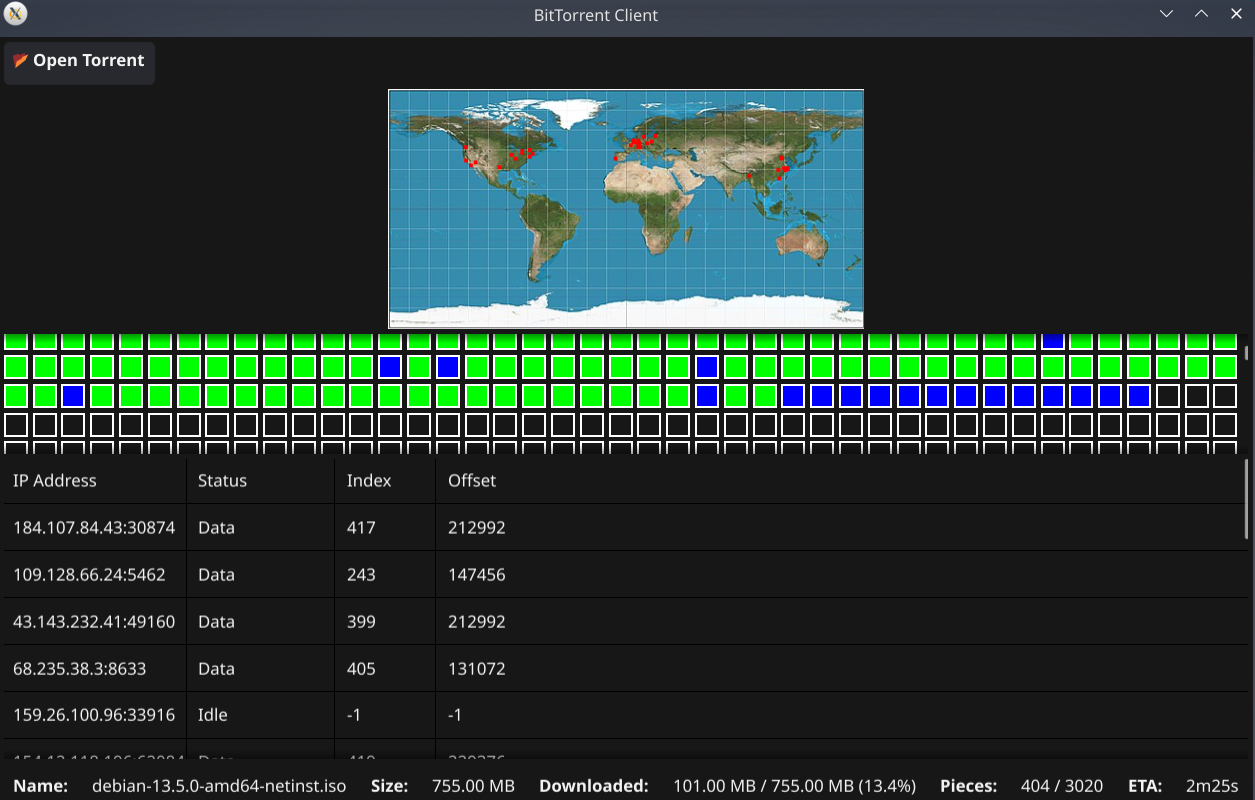
progress
seeding system:
so how the network actually works?
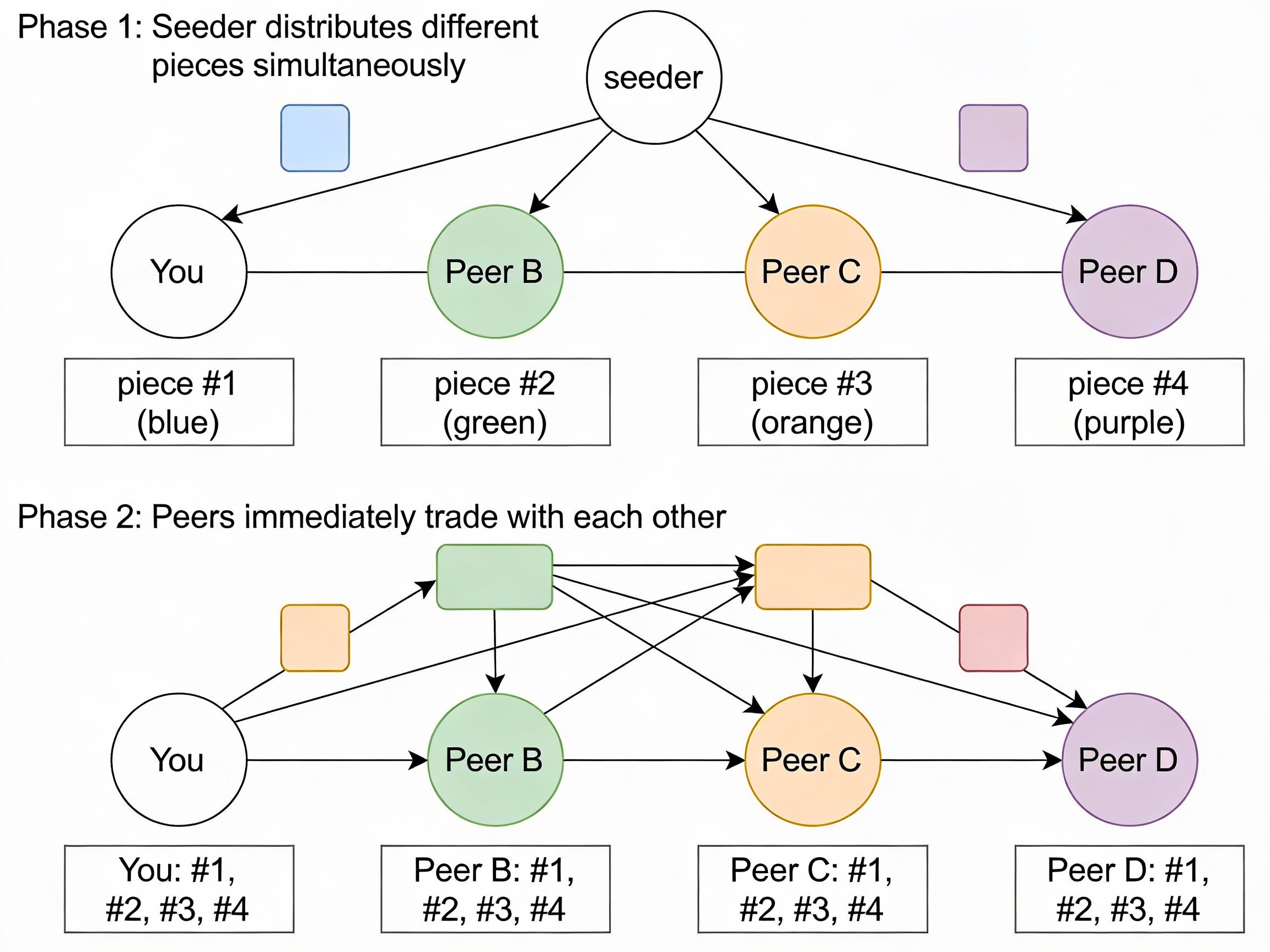
- there is a seeder which has complete file as act as the master or server.
- it dosent share complete file to each peer as it completely destroy the meaning of the protocol. which is to save bandwitch and share the file with each other.
- the seeder split the file and pieces and share each pierce to each node in the
Choke system
Free riders are the peers in the network that exist only to download the files but they never upload anything to any peer. Hence they are consuming the network bandwidth without contributing back.
The Choke algorithm is hence designed in a way that penalizes such free riders.
choke: “I will NOT upload pieces to you right now.” (Temporary refusal to send data.)
unchoke : Okay, now I WILL upload to you.” (You may start requesting blocks.)
Interested: “You have pieces I want, so I want to download from you.”
Not interested / Uninterested: “You have nothing I need right now, so I won’t request from you.”
From leechers perspective
situation: say you piece 5# and need piece 3#
• You can’t upload to everyone at full speed, so you choose only a few peers to upload to.
and 5 peers are interested as they want that piece and they have want you want. now you rank all by uploading speed and select the top 3 fastest one. and unchock them.
Peer A → uploading to you at 800 KB/s
Peer B → uploading to you at 600 KB/s
Peer C → uploading to you at 450 KB/s
Peer D → uploading to you at 300 KB/s
Peer E → uploading to you at 100 KB/s
Peer L → uploading to you at 0 KB/s (free rider)
occasionally unchoke one random peer so if a peer dont have what you want he will be chocked forever (commonly about every ~30 seconds / every few rechoke rounds, depending on client) its called Optimistic unchoke.
why? A brand-new leecher may have 0 pieces, so it can’t reciprocate yet; optimistic unchoke lets it download its first pieces so it can start trading later.
From seeder perspective
Goal: Maximize overall swarm health and distribution speed it dosent need any download cause it already have full file.
Algorithm:
- Unchoke peers who are uploading most to OTHER peers (not to seeder)
- OR: Round-robin rotate through all interested peers fairly
- OR: Unchoke peers with fastest download FROM seeder (reward good connections)
Different clients use slightly different strategies, but common approach is upload-based ranking of peers in the swarm.